
MICROSOFT 365 SOLUTIONS
The Foundation of Your Business,
Properly Managed
Licensing, security, migration, and everyday management for Microsoft 365 —
from a team that works in it every day.
Microsoft 365 is Microsoft's cloud subscription that bundles productivity apps — Word, Excel, Outlook, Teams, SharePoint, and OneDrive — with security and management tools like Microsoft Entra ID, Intune, Defender, and Purview. Sourcepass handles the Microsoft 365 lifecycle: licensing, migration, security hardening, and paid support for your IT team when you need it.
Speak with a Specialist Get a M365 Assessment
MICROSOFT 365
The Environment You Can't
Afford to Get Wrong
Microsoft 365 is how most businesses actually run day to day — email, files, meetings, and increasingly security and compliance.
That also makes it the environment where mistakes surface fastest: a rushed migration that drops mailboxes, a security setting left at its default, or licensing that quietly drifts out of alignment with what people actually use. Doing it well takes planning, not just switching it on.
What Is Microsoft 365?
Microsoft 365 is Microsoft’s cloud platform that combines productivity apps like Word, Excel, Outlook, Teams, OneDrive, and SharePoint with security and management tools such as Entra ID, Intune, Defender, and Purview. It also includes Microsoft 365 Copilot for AI-powered assistance.
Plans are offered in Business tiers for organizations with up to 300 users and Enterprise tiers for larger organizations needing advanced security and compliance capabilities. Specialized GCC and GCC High environments support organizations with stricter regulatory requirements.
The Business Case for Microsoft 365
ROI REPORTED
OVER 3 YEARS
HOURS SAVED
PER USER PER WEEK
MONTHS OR LESS
TO PAYBACK
SOURCEPASS CAN RUN YOUR MICROSOFT 365
But Our Center of Excellence for
Microsoft Takes it Further
Sourcepass can license, migrate, secure, and manage Microsoft 365 as part of our managed services. The Sourcepass Microsoft Center of Excellence (MCOE) takes it to the next level.
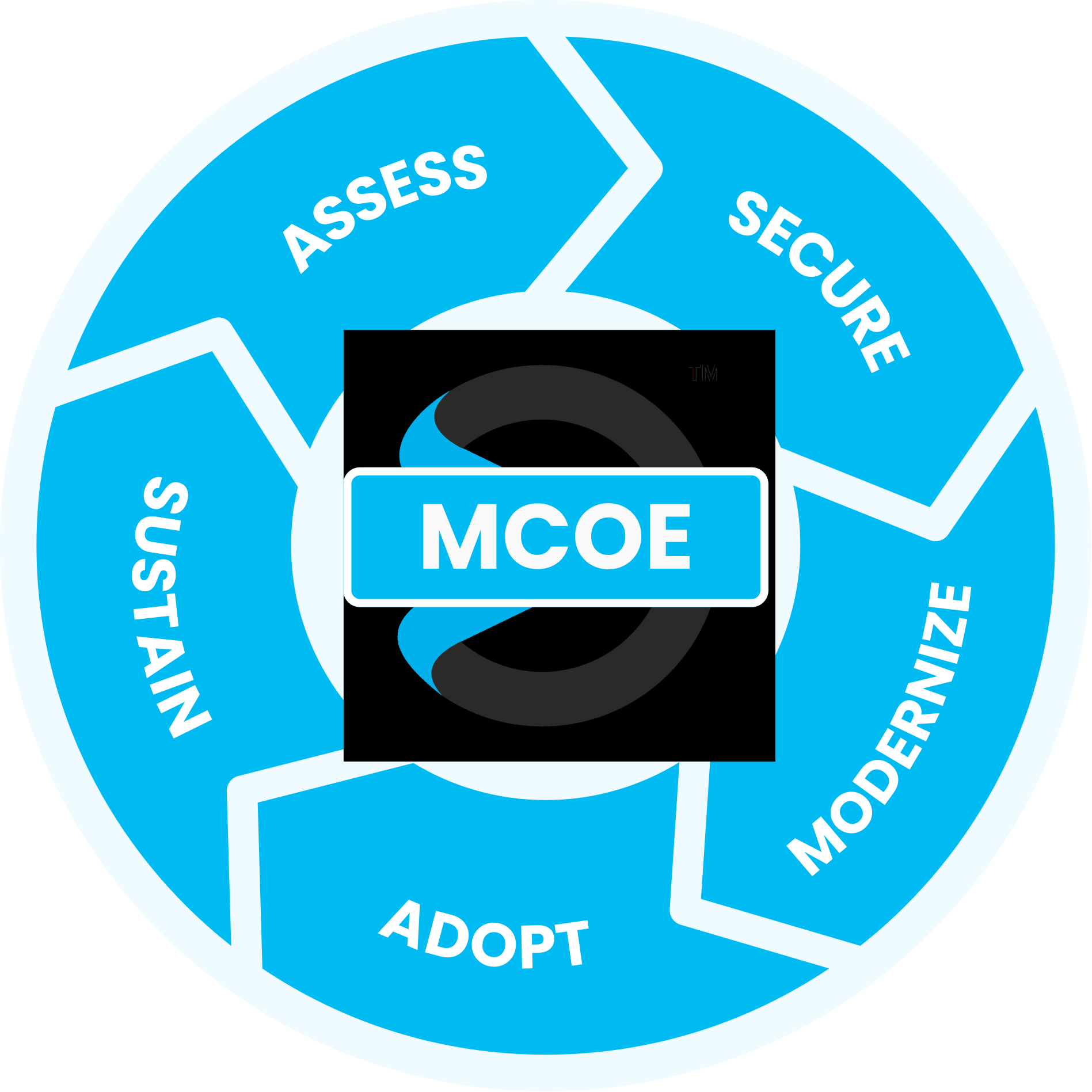
Available on its own, no matter who supports the rest of your IT, Sourcepass MCOE runs Microsoft 365 through a full five-stage framework so licensing fits how you actually work, they ensure your environment is secured and compliant and migrations land cleanly, all while keeping pace with Microsoft’s constant change.

Licensing & Advisory Engagement
Managing your own tenant?
MCOE can still handle licensing and the decisions around it — which plan actually fits, and where GCC or GCC High is genuinely required. Licensing and advisory engagements are available on their own, no matter who supports the rest of your IT.
Practice Engagement
Maximize your Microsoft investment with our proven process
guided by the experts at the Sourcepass Center of Excellence for Microsoft.
Assess: Licensing and Environment Review
We start with our Assess stage — reviewing your current Microsoft 365 licensing against what your organization actually uses, and determining whether GCC or GCC High applies to your compliance needs.
SPECIALIZED MICROSOFT EXPERTISE
Why Sourcepass MCOE?
Sourcepass MCOE is the dedicated Microsoft practice within Sourcepass, built to help organizations get more from Microsoft.
Every engagement is backed by specialized Microsoft expertise; two Pax8 Global Microsoft Copilot MVP Awards; Microsoft Solutions Partner designations across Security, AI Business Solutions, and Cloud & AI Platforms; and the national resources of one of the country’s top-ranked managed services providers.

Frequently Asked Questions
For a mid-sized business, migrations typically take a few weeks to a few months, depending on data volume, integrations, and testing needs.
It depends on your compliance requirements. Organizations handling controlled unclassified information under CMMC often need GCC High specifically, while many other businesses are well served by commercial Microsoft 365 or standard GCC.
Historical data migration is planned as part of the project from the start, so email and files come with you.
In most cases yes, but devices that scan or fax directly to email need to be planned for specifically.
Yes. Many clients already have Microsoft 365 in place and engage us specifically for security hardening or governance work, delivered as its own paid engagement.
As part of MCOE's specialist practice, this means paid, on-demand technical support for your IT team when something comes up, plus a paid ongoing management review if you'd like a recurring check-in on licensing, features, and security recommendations.
Yes. These require specific handling and are accounted for in the migration plan from the start.
Microsoft 365 offers several licensing tiers with different feature sets, and add-ons like Copilot or additional security tools are often licensed separately. We help match the right licenses to how your team actually works.
Helpful Resources
ASSESSMENT
Security Assessment for Microsoft 365
Gain clear visibility into your Microsoft 365 security, risk, and readiness with the Sourcepass M365 Security Assessment.
PODCAST
What's New in M365 Business Premium
Business Premium now serves as a base for advanced tools like Microsoft Defender and Microsoft Purview.
PODCAST
Copilot Add-On vs. Business Premium
Sourcepass MCOE breaks down two of the most compelling SMB offerings in the Microsoft ecosystem right now.
More Microsoft 365 Insights
Learn more about how we enable success with our clients, our thoughts on emerging technologies, and how to position your company for growth.
Microsoft 365 Incident Investigation Playbook for SMBs
How to Use Copilot, Facilitator, and Loop in Teams Meetings
Control Microsoft 365 App Consent and Third-Party Access
Trademark attribution footnote: Microsoft, Azure, Copilot, Entra, Excel, Intune, Outlook, PowerPoint, Purview, SharePoint, Teams, Windows, and Word are trademarks of the Microsoft group of companies.